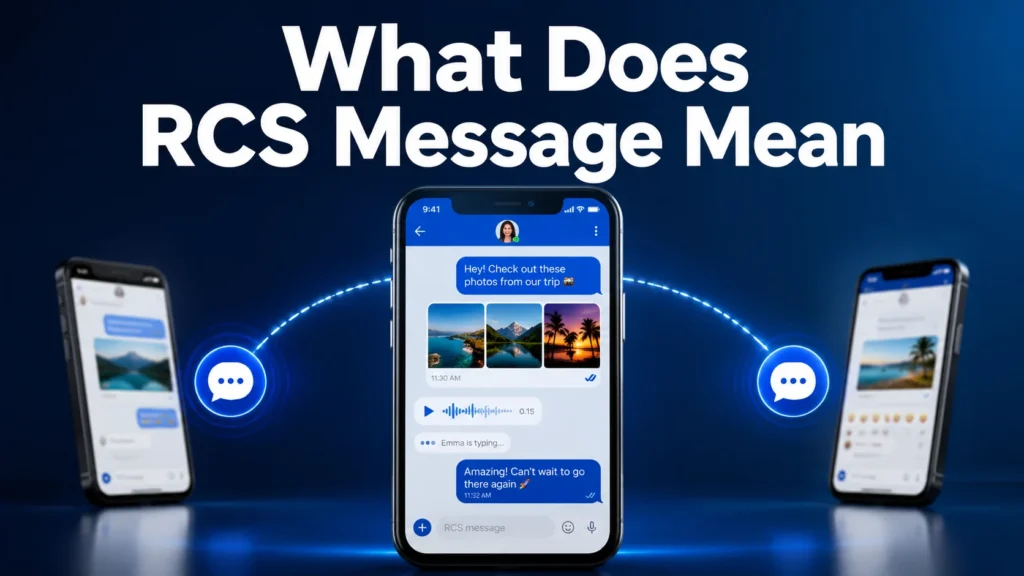
If you have recently seen the words “RCS message” while sending a text, you may wonder what it means and how it is different from a normal SMS.
The term RCS message stands for Rich Communication Services message.
RCS is a modern messaging technology designed to replace traditional SMS and MMS by adding advanced features that people already expect from apps like WhatsApp, Messenger, and iMessage.
Unlike regular text messages, RCS messages can include features such as:
- High-quality photo sharing
- Larger file transfers
- Read receipts
- Typing indicators
- Better group chats
- Improved media sharing
In simple words, an RCS message is an upgraded text message that works through the internet instead of only using a mobile network.
People search for “what does RCS message mean” because they notice new labels in their phone’s messaging app and want to understand whether RCS is different, safe, or better than normal texting.
Understanding RCS helps you know why your phone messaging experience may have changed and what new features are available.
What Does RCS Message Mean – Quick Meaning
What Does RCS Stand For?
RCS = Rich Communication Services
It is a communication standard that improves traditional texting by adding modern messaging features.
A simple way to understand it:
SMS = Basic text messaging
RCS = Advanced internet-based messaging
How RCS Messages Work
Traditional SMS messages use your mobile carrier network.
RCS messages usually use:
- Mobile data
- Wi-Fi internet connection
This allows messages to include richer features.
For example:
A normal SMS:
“See you tomorrow.”
An RCS message:
“See you tomorrow.”
plus:
- A high-quality photo
- A location
- Read status
- Typing indicator
Common Features of RCS Messages
RCS can provide:
- Read receipts – Shows when someone has read your message
- Typing indicators – Shows when someone is replying
- High-quality images – Better photo sharing than MMS
- Larger attachments – Supports bigger files
- Improved group chats – Better group messaging experience
- Better security options – Some RCS services support encryption
Example of RCS Messaging
Person A:
“Sends a photo through RCS.”
Person B:
“Receives the original-quality image and can see when the message was read.”
This feels more similar to modern chat apps than traditional texting.
Origin & Background of RCS
Where Did RCS Come From?
RCS was created as an industry effort to improve mobile messaging.
For many years, SMS remained almost unchanged while apps like WhatsApp and Messenger introduced advanced communication features.
Mobile companies wanted a universal messaging system that could provide similar features without requiring users to install another app.
This led to the development of Rich Communication Services.
Why Was RCS Created?
Traditional SMS had several limitations:
- Low-quality images
- Limited message length
- No typing indicators
- No read receipts
- Poor group chat experience
RCS was designed to solve these problems.
Cultural and Technology Influence
The popularity of internet messaging apps changed user expectations.
People became used to features like:
- Seeing when someone is typing
- Sending clear photos
- Reacting to messages
- Creating better group chats
RCS brought many of these features into standard phone messaging.
Social Media and Smartphone Impact
As smartphones became more advanced, users expected normal messaging apps to offer more than basic texts.
Companies began improving default messaging experiences, making RCS more common on modern devices.
Real-Life Conversations
Text Message Conversation
Person A:
Why does my message say RCS?
Person B:
Your phone is using Rich Communication Services instead of normal SMS.
and,
Person A:
So it’s like WhatsApp?
Person B:
Yes, it gives you similar features.
Android Messaging Conversation
Person A:
I sent a picture, and it looks much clearer now.
Person B:
That’s because it was sent as an RCS message instead of MMS.
Meaning:
RCS improves media quality.
Group Chat Conversation
Person A:
Can everyone see my message?
Person B:
Yes, the group chat is using RCS.
Meaning:
The chat supports advanced messaging features.
Phone Settings Conversation
Person A:
Why do I see “Chat message” instead of “Text message”?
Person B:
Your messaging app has RCS enabled.
Meaning:
The phone is using internet-based messaging.
Emotional & Practical Meaning of RCS Messages
What Does RCS Change About Communication?
RCS does not change the meaning of your words.
Instead, it improves how messages are delivered and experienced.
It makes digital conversations feel more natural because people can see:
- When messages are delivered
- When someone is typing
- When someone has read a message
Why People Prefer RCS
Modern communication is more interactive than traditional texting.
People want:
- Faster conversations
- Better media quality
- More control
- More connection
RCS provides these improvements while keeping the convenience of the phone’s default messaging app.
Personal-Style Scenario
Imagine sending a birthday photo through normal MMS.
The image may arrive blurry.
With RCS, the same photo can appear clearer, and you may know when your friend has seen it.
The conversation feels smoother and more personal.
Usage in Different Contexts
RCS Messages on Smartphones
RCS is mainly used through default messaging apps on modern smartphones.
It is commonly available through:
- Android Messages
- Google Messages
- Supported carrier messaging services
When both users have RCS enabled, their conversation may automatically switch from SMS to RCS.
Example:
Instead of seeing:
“Text message”
you may see:
“Chat message”
This usually means RCS features are active.
RCS in Personal Conversations
For everyday communication with friends and family, RCS improves the texting experience.
People can enjoy:
- Faster conversations
- Better photo sharing
- Read receipts
- Typing indicators
- Better group chats
Example:
Person A:
“I’m sending you vacation pictures.”
Person B:
“Great, I can see them in high quality.”
The improved experience makes regular texting feel closer to using messaging apps.
RCS in Professional Communication
RCS can also be useful for businesses and customer communication.
Companies can use RCS for:
- Appointment reminders
- Order updates
- Verification messages
- Customer support
- Promotional messages
Example:
A delivery company can send:
“Your package arrives today.”
with:
- Company branding
- Buttons
- Tracking links
- Images
This creates a richer customer experience compared with basic SMS.
RCS in Group Chats
Traditional SMS group chats have many limitations.
RCS improves group conversations by allowing:
- Better media sharing
- More reliable messaging
- Read receipts
- Typing indicators
This makes group communication smoother.
RCS Message vs SMS vs MMS vs iMessage
| Messaging Type | Meaning | Main Features |
|---|---|---|
| SMS | Short Message Service | Basic text messages |
| MMS | Multimedia Messaging Service | Photos and videos with limits |
| RCS | Rich Communication Services | Modern chat features and better media |
| iMessage | Apple messaging service | Advanced messaging between Apple devices |
| Internet messaging app | Text, calls, media, groups |
Key Insight
RCS brings many features people already know from apps like WhatsApp and iMessage into standard phone messaging. However, it depends on device support, internet connection, and carrier availability.
When RCS Messages Do Not Work
No Internet Connection
RCS requires internet access.
If you have:
- No Wi-Fi
- No mobile data
- Poor network connection
your message may send as SMS instead.
Recipient Does Not Support RCS
For RCS features to work, both people usually need compatible messaging services.
If the other person does not have RCS enabled, the conversation may switch back to SMS.
RCS Settings Are Disabled
Sometimes RCS does not work because the feature is turned off.
You may need to check:
- Chat settings
- Messaging app settings
- Internet connection
Carrier or Device Limitations
Some older phones or networks may not fully support RCS features.
Availability depends on:
- Phone model
- Messaging app
- Country
- Mobile provider
Common Misunderstandings About RCS Messages
RCS Is Not the Same as SMS
Many people think RCS is just another name for texting.
It is different.
SMS:
- Uses carrier networks
- Supports basic messages
RCS:
- Uses internet technology
- Supports advanced features
RCS Is Not a Separate App
So, RCS usually works inside your existing messaging app.
You do not always need to download a new application.
RCS Does Not Require Everyone to Use the Same Phone Brand
RCS was designed to work across supported devices.
However, compatibility depends on software and service support.
RCS Is Not Always Available Everywhere
Some users may have RCS while others still use SMS.
The experience depends on their device and network.
Variations and Types of RCS Messaging
1. Basic RCS Chat
Meaning: Standard RCS conversation between supported users.
Includes:
- Text messages
- Delivery status
- Read receipts
2. RCS Group Chat
Meaning: Enhanced group messaging.
Allows:
- Better group conversations
- Media sharing
- Participant information
3. RCS Media Sharing
Meaning: Sending photos, videos, and files with better quality.
4. Business RCS
Meaning: Companies communicating with customers through richer messages.
Examples:
- Booking confirmations
- Delivery updates
- Customer support
5. Verified RCS Messages
Meaning: Business messages showing verified company information.
6. RCS Reactions
Meaning: Adding reactions to messages.
Example:
A thumbs-up reaction instead of sending another message.
7. RCS Read Receipts
Meaning: Showing whether a message has been opened.
8. RCS Typing Indicators
Meaning: Showing when someone is writing a reply.
9. RCS File Sharing
Meaning: Sending larger files compared with traditional MMS.
10. RCS Over Wi-Fi
Meaning: Using Wi-Fi internet instead of mobile data.
Is RCS Message Safe?
RCS is generally considered safe for normal communication.
However, users should still follow basic digital safety practices.
Safety Tips
Avoid:
- Clicking unknown links
- Sharing private information with strangers
- Responding to suspicious messages
Be careful with:
- Unknown senders
- Unexpected business messages
- Fake verification requests
Security features may vary depending on the messaging service and provider.
FAQs About What Does RCS Message Mean
What does RCS message mean on Android?
An RCS message on Android means your phone is using Rich Communication Services instead of traditional SMS.
It allows features like typing indicators, read receipts, and better media sharing.
Is RCS better than SMS?
Yes, RCS provides more features than SMS.
However, SMS remains useful because it works without internet and is supported almost everywhere.
Does RCS use internet data?
Yes. RCS usually uses mobile data or Wi-Fi to send messages.
Can iPhone users receive RCS messages?
Modern iPhones support RCS in many regions, allowing improved messaging with compatible Android devices.
How do I know if my message is RCS?
Your messaging app may show:
- “Chat message”
- Read receipts
- Typing indicators
instead of a normal text message label.
Does RCS cost money?
RCS usually does not have a separate charge.
It uses your internet connection, so normal data charges may apply depending on your mobile plan.
Can I turn off RCS?
Yes. Most messaging apps allow users to disable RCS through chat settings.
Conclusion
The meaning of an RCS message is Rich Communication Services message. It is an improved version of traditional texting that adds modern features like read receipts, typing indicators, better photos, and enhanced group chats.
RCS was created because people wanted normal texting to offer the same convenience they experience in apps like WhatsApp and iMessage.
While RCS provides a better messaging experience, it depends on device support, internet connection, and settings.
Understanding RCS helps you know why your phone messages may look different and what features are available.
As mobile communication continues to evolve, RCS represents a step toward making everyday texting faster, smarter, and more interactive.